If you’re an Etsy seller who needs a lot of mockups fast, the latest Canva Sheets and Bulk Create features are built for you. Canva Sheets is like an Excel spreadsheet that lets you store designs. You can also use the Bulk Create option to generate multiple finished mockups automatically in a single run.
Let’s understand how to set up Canva’s bulk mockup workflow using our practical guide.
Step-by-step Canva Sheets Bulk Mockup Workflow
In this tutorial, you’ll learn how to connect a Canva Sheet to a design template and generate mock-ups at scale.
Step 1: Pick a Template with Clean, Consistent Placeholders
Open Canva and choose your prepared mockup template that already has image frames/placeholders.
Make sure every placeholder is clearly defined and uses consistent sizing across all pages.
Step 2: Create Your Sheet & Upload Artworks
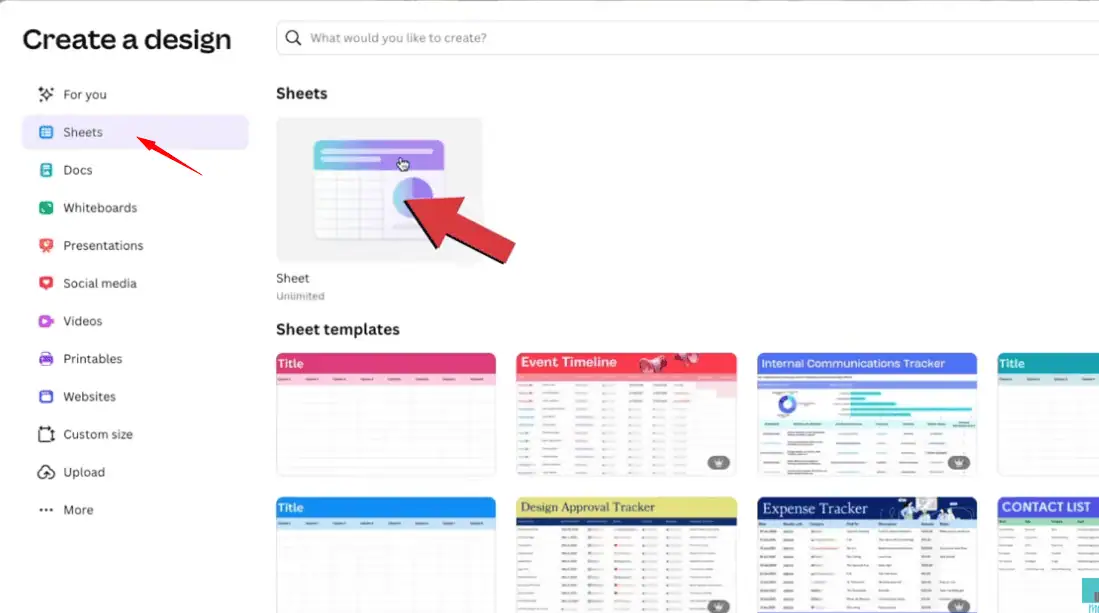
In Canva, open the left menu and click Sheets. Create a new sheet.
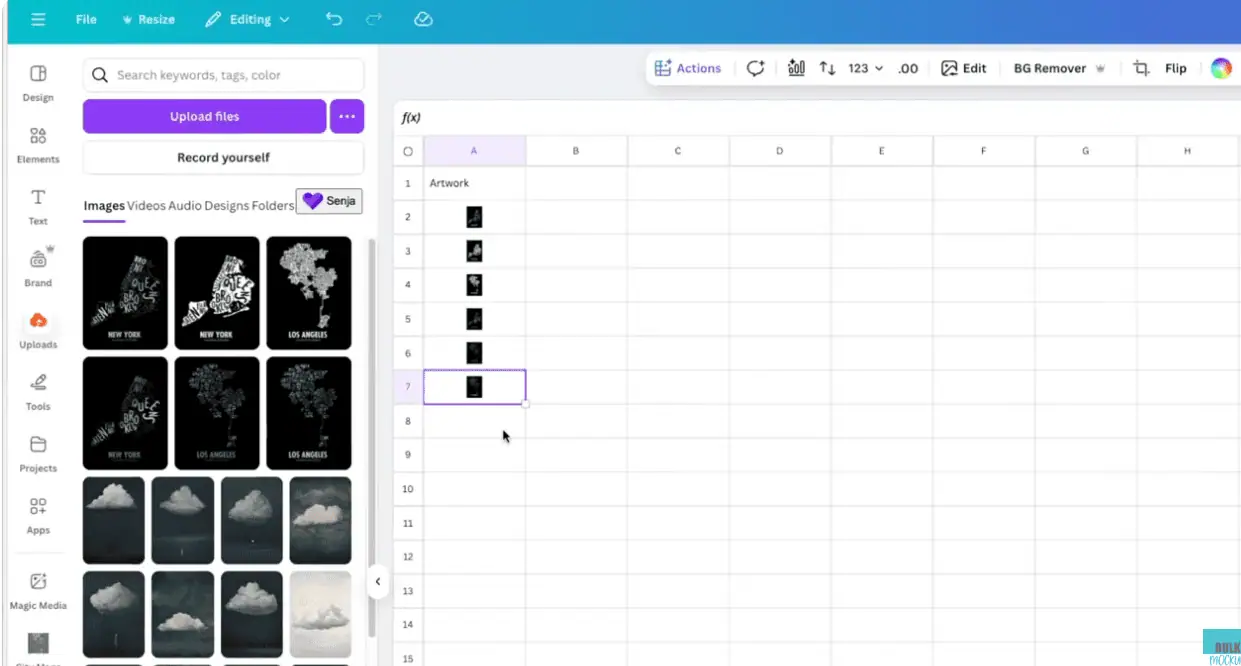
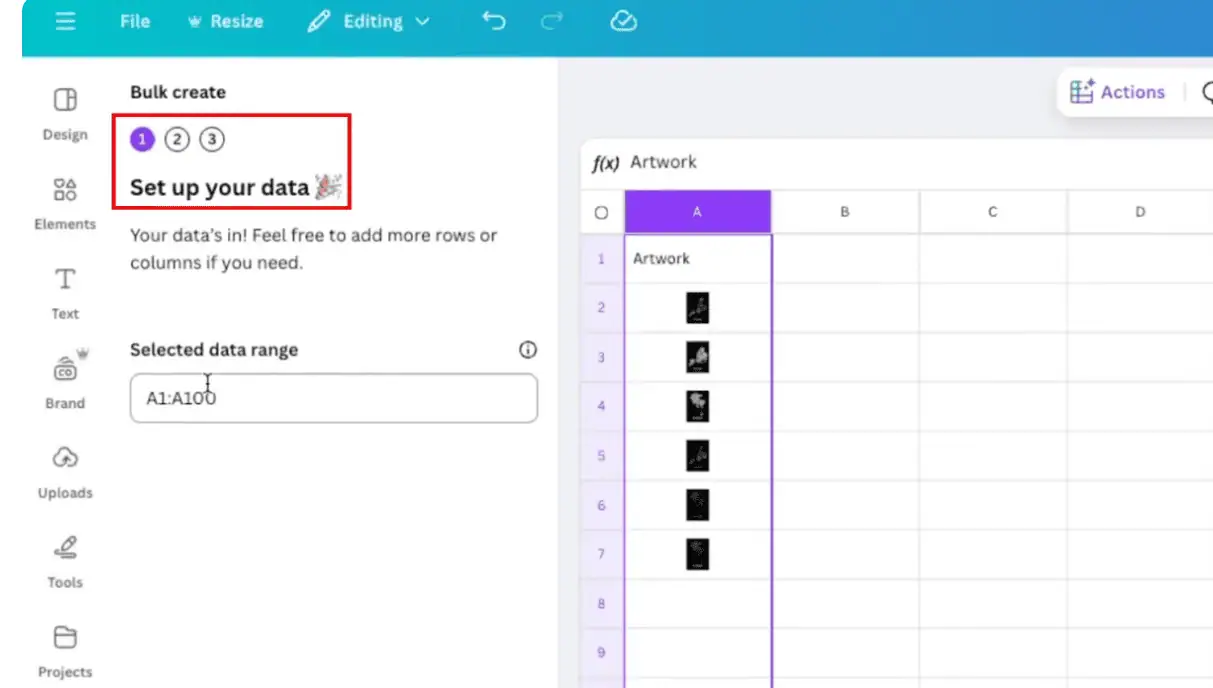
In column A, name the header artwork/design or any title you prefer. This column will store your image files.
Treat each row as one design you want to generate mockups for.
Go to the Uploads option, where you’ll see your mockup design files. (Note: We’re using artwork designs for this guide.)
Drag one artwork into each cell under the artwork column A.
Repeat until each row has one artwork.
Step 3: Connect Sheet to Mockup Template & Set Up Data
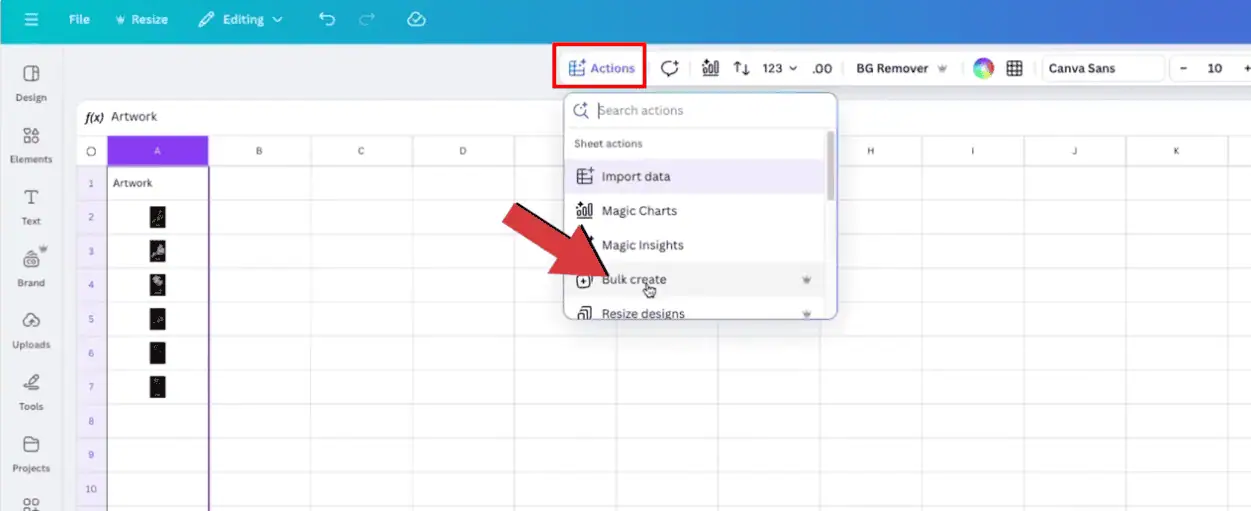
Select the entire column A and go to the top menu, click Actions.
Choose Bulk create from the drop-down list.
A new Bulk create panel will open on the left. Click Continue.
In the next step, Canva will ask you to Choose your template. Pick the prepared mockup template you added in Canva earlier.
Click Continue.
Step 4: Connect Sheet Data to Each Placeholder
Now, open your mockup template page.
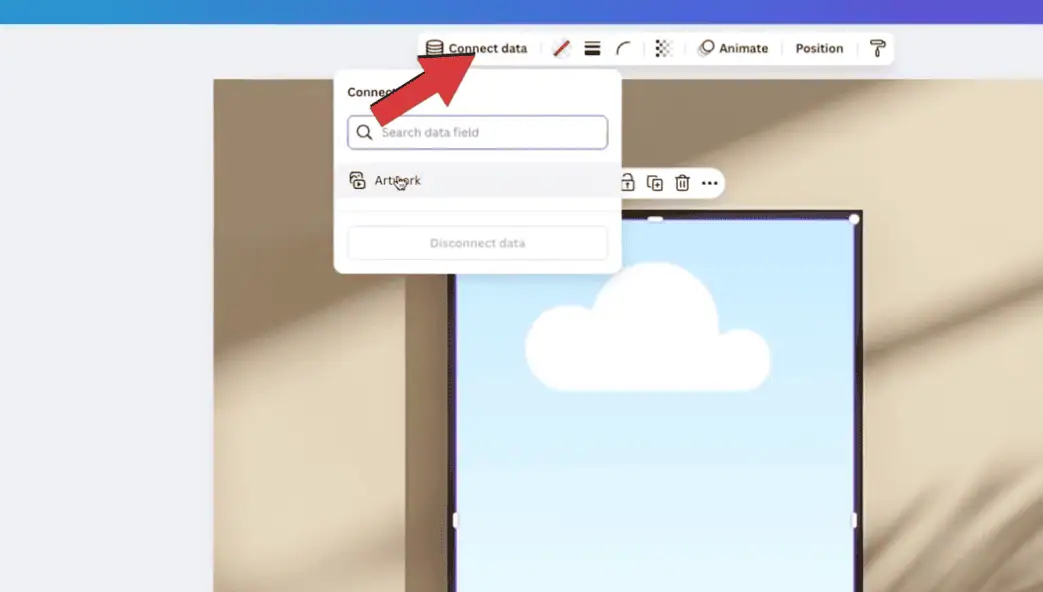
Click the first placeholder frame where you want to place the artwork.
Click Connect data from the top menu.
From the dropdown, select artwork.
Repeat the same step on every placeholder across all pages that should create your mockup.
Step 5: Generate Designs and Review Outputs
Click Create designs from the Bulk create panel on the left.
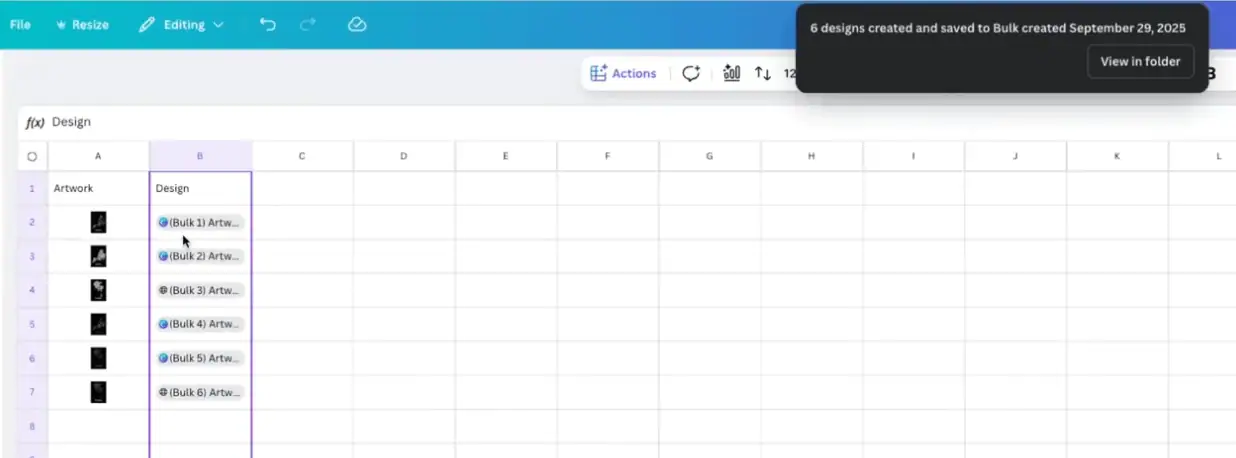
Canva will auto-generate one new design set per row.
You’ll see new Canva document links appear next to each row in your sheet.
Now, you can open any link to preview results if you want.
Just download each mock-up file and upload the files to your Etsy store.
Common Scaling Issues Faced by Etsy sellers with Canva Sheets
Canva Sheets feature is smooth for small batches of 10–20 designs, but not worth it for large catalogs. Here are the key limitations of using the latest Canva Sheets feature.
Canva Sheets doesn’t let you bulk-import hundreds of images into Sheets automatically.
Dragging files one by one in each cell becomes repetitive and the real-time cost when scaling.
Mixed aspect ratios also require manual tweaks per file.
Canva doesn’t recognize external image links from Google Sheets, Airtable, or other automation tools.
It creates a separate Canva file for every design, not allowing bulk downloads.
Bulk Create is a paid feature that is available only for Canva Pro subscribers.
Switch to a Scalable Alternative: Bulk Mockup
For a small Etsy shop, this new Canva feature feels fast. You upload 5 to 20 designs, link them once, hit generate, and download your mockups.
The problem starts when you try to scale.
Canva doesn’t let you upload a whole folder of 200 or 500 designs straight into the Sheet in one click. Plus, you have to download and organize each file individually after mock-up generation. This slows down your entire bulk mockup process.
But a dedicated Bulk Mockup tool can help automate the workflow for full-scale production. It runs as a Photoshop plugin that batch-replaces smart objects from an input folder, auto-resizes where needed, and exports thousands of mockups at once with proper naming and folder structure.
If your Etsy shop is moving past small weekly batches, the Bulk Mockup tool is a great Canva Sheets alternative.
FAQ
How should Etsy sellers decide between Canva Sheets and a tool like Bulk Mockup?
Use Canva Sheets if you are testing offers, running small drops, or prefer an all-in-one design tool. When you manage big catalogs, PSD mockups, and frequent launches, a plugin like Bulk Mockup usually saves more time across each upload cycle.
What is Canva Sheets and how does it help Etsy sellers create mockups?
Canva Sheets is a spreadsheet inside Canva where each row represents one design. Etsy sellers can drag artwork into cells, link the column to a mockup template, and have Canva automatically generate multiple product images in a single batch.
How do I use Canva Bulk Create with Sheets to make mockups in one go?
Open your mockup template, create a Canva Sheet with one artwork per row, then launch Bulk Create, connect the artwork column to each placeholder frame, and click Create designs. Canva will output a separate mockup set for every row.
Do I need Canva Pro to use Bulk Create for mockups?
Yes, Bulk Create is a Canva Pro feature. Free users can still design mockups manually, but the automation that connects Sheets data to templates and generates many designs at once is only available on paid Pro plans.
Can I upload hundreds of designs into Canva Sheets automatically?
Right now, Canva Sheets does not support true bulk image import into cells. You can drag designs from the Uploads panel, but adding hundreds of images still means placing them one by one, which becomes slow for large catalogs.
Does Canva automatically resize artwork to fit mockup frames in bulk?
Canva does not automatically resize every artwork perfectly for bulk mockups. If your file sizes or aspect ratios differ from the placeholder frames, you will see cropping or empty gaps and need to adjust or standardize artwork dimensions yourself.
Is Canva Sheets enough for large Etsy shops with big catalogs?
For small Etsy batches of 5 to 20 designs, Canva Sheets is smooth and fast. Once you handle hundreds of designs, manual uploading, per-file checks, and downloads make the workflow heavy and better suited to a dedicated bulk tool.
What is a bulk mockup tool and how is Bulk Mockup different from Canva Sheets?
A bulk mockup tool is built for high-volume production. Bulk Mockup, for example, runs inside Photoshop, batch-replaces smart objects from a folder, auto-fits artwork across templates, and exports organised mockups ready for Etsy listings in far fewer clicks.
Vikash is the founder of Bulk Mockup, a specialized plugin that integrates with Photoshop to streamline mockup creation for print-on-demand sellers. Drawing from his experience running Putoos Graphics LLP, an image editing agency serving hundreds of e-commerce entrepreneurs, he recognized the time-consuming challenges of manual mockup production. Bulk Mockup was developed to automate this process, helping sellers save valuable time and resources while professionally presenting their products