

Want to start an online business without buying inventory or renting storage space? Shopify dropshipping makes it possible to sell products without keeping them in stock. Instead, a supplier handles packaging and shipping, allowing you to focus on building your store and attracting customers.
You can take two approaches. Traditional dropshipping lets you sell existing products from suppliers, while print-on-demand allows you to offer customised T shirts, mugs, posters, and hoodies made after customers order.
Both require careful product selection, reliable suppliers, attractive listings, and proper order management.
But where should you begin, and what does it take to get your first sale? In this guide, you’ll learn how to dropship on Shopify, from setting up your store and connecting suppliers to adding products, automating routine tasks, and processing your first order.
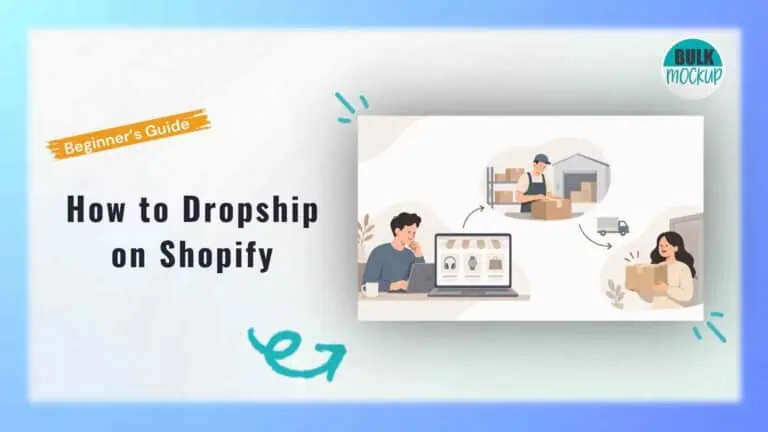
Shopify provides the online store where customers browse products, place orders, and pay. Your supplier handles inventory, packaging, and shipping.
Here’s how the process works:
With print on demand, you upload a design, and your provider prints and ships the customised product after purchase.
You can start dropshipping on Shopify using different sourcing methods, depending on your product range, supplier preferences, and business goals.
| Method | How it works | Best suited for |
| Dropshipping apps | Connect your store with supplier catalogues and order fulfilment services. | Beginners testing existing products |
| Shopify Collective | Eligible merchants source products from other Shopify brands. | Stores seeking established supplier partnerships |
| Direct supplier partnerships | Work directly with suppliers to arrange sourcing, pricing, and shipping. | Sellers wanting greater control |
| Print on demand | Suppliers manufacture customised products after customers place orders. | Designers, creators, and merchandise sellers |
Print on demand is also a form of dropshipping, since you don’t need to stock finished products or handle shipping yourself. However, traditional dropshipping focuses on reselling existing products, while print on demand lets you sell items featuring your own designs.
Setting up a Shopify dropshipping business involves choosing products, finding suppliers, creating your store, and preparing it to accept orders. The following steps cover both traditional dropshipping and print-on-demand, with differences in product sourcing, customisation, and fulfilment.
A niche is a specific product category or customer group your store serves. Choosing one helps you identify your target audience, find suitable suppliers, and create a consistent product range.
To research potential niches:
For traditional dropshipping, you might consider pet travel accessories, home organisation products, or fitness equipment. Print on demand sellers can explore minimalist wall art, hobby apparel, personalised gifts, or custom stationery.
Before committing, assess competition, product quality, shipping requirements, and potential margins. Avoid choosing a niche solely because a product is trending on TikTok or other social platforms.
Once you have a niche, research individual products before adding them to your store. Shopify dropshipping for beginners works best when you start with a manageable selection that you can evaluate properly.
Use these platforms to guide your research:
| Research platform | What to examine |
| Google Trends | Search interest and demand patterns |
| Google Shopping | Competing products, prices, and positioning |
| Amazon Best Sellers | Popular products within established categories |
| TikTok Creative Center | Product advertising trends and creative examples |
| Meta Ad Library | Advertiser messaging and product promotions |
| Customer reviews | Complaints, missing features, and buyer expectations |
Prioritise products with identifiable demand, reasonable sourcing costs, and opportunities to stand out. Check their weight, dimensions, safety requirements, shipping reliability, and likelihood of returns.
For print-on-demand sellers, product research includes selecting a physical item and developing a relevant design concept. For example, you could offer illustrated mugs for pet owners, themed T shirts for hobby communities, or wall art in multiple sizes and frame styles.
Your supplier influences product availability, delivery performance, customer satisfaction, and profitability. Shopify supports several sourcing services that help merchants connect with suppliers.
Here are some popular Shopify dropshipping suppliers and platforms to consider:
| Platform | Supplier category | Main purpose |
| DSers | Traditional dropshipping | AliExpress sourcing and order management |
| AutoDS | Traditional dropshipping | Product sourcing and automation |
| Spocket | Traditional dropshipping | Supplier discovery, including US and EU sourcing |
| Zendrop | Traditional dropshipping | Product sourcing and fulfilment |
| Syncee | Traditional dropshipping | Supplier catalogue integrations |
| Printful | Print on demand | Custom products, printing, and fulfilment |
| Printify | Print on demand | Customisable products and print provider integrations |
Compare potential suppliers using these criteria:
The next stage is setting up your storefront. You’ll need a Shopify account, an appropriate subscription, and a store design that matches the products you plan to sell.
Follow these steps to create your Shopify store:
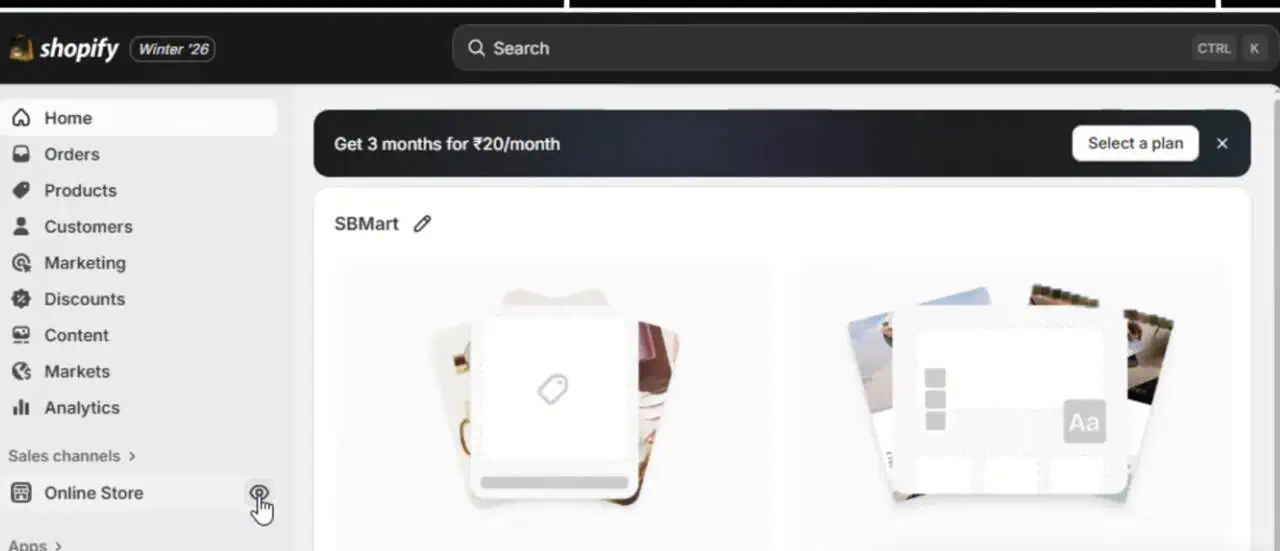
For a traditional dropshipping store, organise collections around product categories. If you sell customised products, group collections by artwork themes, product types, or customer interests.
Shopify dropshipping apps connect your store with sourcing and fulfilment services. Depending on the integration, they can simplify importing products, synchronising inventory, and processing orders.
To connect a dropshipping app:
For traditional dropshipping: Services such as DSers, AutoDS, and Spocket let you find products from connected suppliers and import them into Shopify. Depending on the app, inventory monitoring, pricing updates, and order processing may also be available.
For print on demand: Connect a service such as Printful or Printify. Select a product, upload your artwork, configure colours and sizes, and publish the listing to Shopify. Supported integrations can then receive customer orders for printing and fulfilment.
Check whether your selected app requires manual order approval, supplier payment, or other actions before an order enters production.
Your Shopify product listings should give customers accurate information about what they are purchasing.
You can import dropshipping products through a connected supplier app or add them manually using Products > Add product in Shopify.
Each listing should include:
Avoid publishing supplier catalogue descriptions without editing them. Explain the product’s actual features, dimensions, materials, and benefits in language your customers can understand.
Use consistent, high quality visuals that match the variants available for purchase.
Creating product visuals becomes a substantial task when you sell many designs across different products. Each design may require several mockups showing alternative colours, settings, or presentation styles.
For example, a wall art seller with 100 designs and five presentation styles needs 500 product mockup images.
Rather than preparing each image and listing individually, you can use Bulk Mockup for Shopify to create mockups and publish products in bulk.
The workflow involves:
Bulk Mockup supports compatible templates with multiple Smart Object placements. Its combined mockup generation and product publishing workflow reduces the need to prepare images, repeat listing information, and upload products individually.
This is especially useful when selling apparel, wall art, mugs, or other customised products with many designs.
A product’s selling price should cover more than its purchase cost. Consider the following expenses:
For print on demand, printing charges may vary according to product type, design placement, size, or colour. Check these differences before assigning prices to individual variants.
Before accepting orders, configure how customers will pay, where products can be delivered, and which store policies apply.
Set up payments
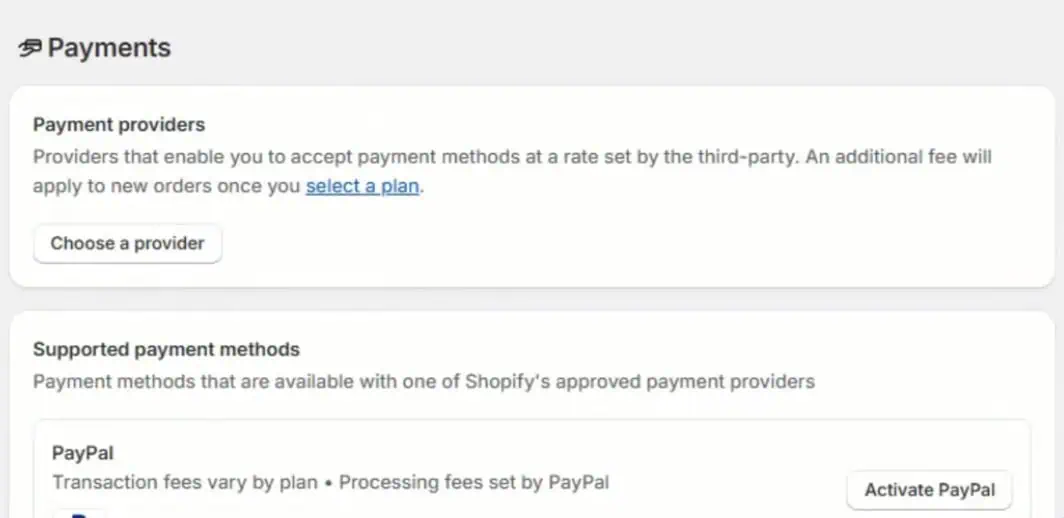
3. Complete the required business and account verification.
4. Review payment processing fees and payout schedules.
Payment provider availability depends on your business location.
Configure shipping
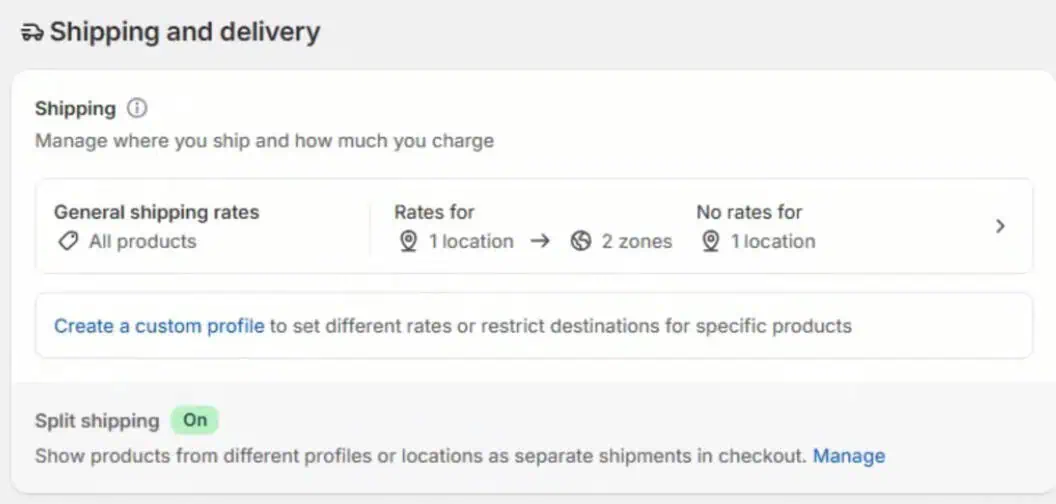
For POD orders, include production time in your delivery estimates. Different print providers and products may have different fulfilment schedules and shipping charges.
Review taxes and policies. Check your obligations for sales taxes, VAT, import duties, and other applicable charges.
Create refund, privacy, shipping, and terms of service policies using Shopify’s available settings. Make sure your return conditions reflect supplier procedures and applicable consumer protection laws.
A test order helps identify checkout problems, incorrect shipping charges, and missing order notifications before customers start purchasing.
Shopify supports simulated transactions through its Test payment gateway or Shopify Payments test mode, where available.
Follow these steps:
Once your store is ready, remove its storefront password when permitted by your Shopify plan and begin attracting potential customers.
Choose marketing channels based on your products and target audience rather than promoting everything everywhere.
When a customer completes checkout, your next task is to confirm that the supplier receives the correct order and fulfils it.
The process varies slightly between traditional dropshipping and print on demand.
Traditional Dropshipping
Print on Demand Dropshipping
Regardless of which method you use, customer service remains your responsibility. Respond to delivery delays, damaged products, incorrect items, and refund requests promptly.
You don’t need to purchase inventory upfront to start a Shopify dropshipping business, but there are other setup and operating expenses to consider.
Here are the main costs involved:
According to Shopify’s dropshipping cost guide, a lean dropshipping business may cost approximately $200 to $600 per month, depending on the tools and marketing activities involved.
Before increasing your advertising budget or expanding your product range, check whether your store can handle more orders profitably.
The following indicators can help you decide when to scale:
Print-on-demand sellers can expand their collections with new designs, colours, and product variations. However, they should continue monitoring print quality and production capacity as orders increase.
Ultimately, a dropshipping store is ready to scale when its sales, profitability, and operations are stable, not simply because it has more products listed.
Adding new designs to your Shopify store should not require creating every product image and listing from scratch. With the right tools, you can automate much of the preparation and publishing process.
Bulk Mockup allows you to generate mockups and publish multiple products directly to your Shopify store. It uses compatible PSD Smart Object templates to replace designs, resize artwork, and produce product images in batches.
You can also configure product titles, descriptions, prices, variants, and images before publishing your listings in bulk. This reduces the time spent preparing individual products and uploading their details manually.
For order fulfilment, connected POD services such as Printful or Printify can process customer orders and arrange printing and shipping.
Want to create and publish Shopify products faster? Book a demo with Bulk Mockup to see how you can simplify bulk mockup creation and product publishing.
Shopify makes it possible to build an online business without purchasing or storing inventory. Whether you choose traditional dropshipping or print on demand, finding suitable products, selecting reliable suppliers, and setting up fulfilment correctly are essential.
Shopify apps can simplify order processing, while Bulk Mockup helps print on demand sellers create product images and publish listings in bulk.
You don’t need hundreds of products to get started. A small, carefully selected catalogue gives you more control over product quality, supplier performance, and expenses. Focus on understanding your actual costs and customer demand before expanding your store.
Yes. Shopify dropshipping allows you to sell products without purchasing or storing inventory upfront. Your supplier maintains the stock and ships products directly to customers after they place orders.
You can build your store during Shopify’s free trial, but running a business involves costs. A paid plan is generally required to accept orders, although some dropshipping apps offer free tiers.
Business licence requirements depend on your country, state, and the products you sell. Some locations require registration or specific permits. Check local business regulations and tax obligations before launching your store.
Paid advertising isn’t necessary to get started. You can attract customers through search engine optimisation, organic social media content, relevant online communities, and influencer collaborations. However, building consistent traffic through these channels takes time.
There is no fixed timeline for your first Shopify sale. Some stores attract customers shortly after launching, while others take weeks or months. Results depend on product demand, pricing, website quality, and marketing effectiveness.