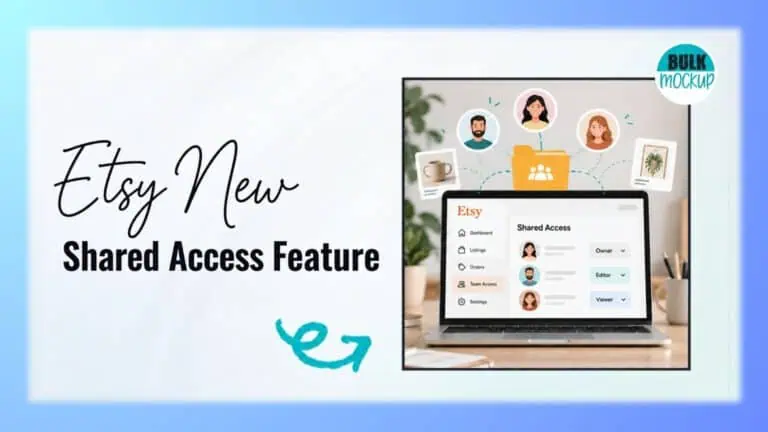


Etsy has introduced a major update for sellers who need an extra pair of hands. Launched in September 2026, Etsy Shared Access lets shop owners invite up to 5 people to help manage orders, listings, and buyer messages using their own accounts. No more sharing passwords to get help with everyday shop tasks.
Developed in response to seller feedback, this new feature could change how growing Etsy shops operate. But how much control can you actually share, and what restrictions apply?
Etsy Shared Access is a new feature that lets shop owners invite trusted people to help run their stores using individual Etsy accounts. Instead of sharing your password, you can give employees, family members, business partners, seasonal assistants, or virtual assistants access to selected shop management tasks.
The main difference is how people access your store. With Etsy shared shop access, each invited person signs in using their own credentials. Traditional password sharing, however, means multiple people use the owner’s login details.
You remain in control of your shop’s financial information, account settings, and other sensitive details. Meanwhile, your team can assist with everyday responsibilities.
The new Etsy Shared Access feature covers 3 main areas of shop management: order fulfillment, product listings, and buyer communication. However, not every shop function is available to invited users.
Here is a breakdown of the current Etsy Shared Access permissions.
| Task | Team member access |
| View and manage eligible orders | ✅ |
| Add tracking information | ✅ |
| Purchase shipping labels | ✅ |
| Mark orders as shipped | ✅ |
| Create product listings | ✅ |
| Edit existing listings | ✅ |
| Publish listings | ✅ |
| View buyer messages | ✅ |
| Reply to buyers | ✅ |
| Cancel orders | ❌ |
| Issue refunds | ❌ |
| Delete or deactivate listings | ❌ |
| View earnings | ❌ |
| Access bank details | ❌ |
| Access marketing tools | ❌ |
| View Shop Stats | ❌ |
| Change shop settings | ❌ |
| Manage connected apps | ❌ |
| Invite or remove team members | ❌ |
These permissions make Etsy team member access useful for listing assistants, fulfillment staff, customer support workers, and seasonal employees.
One detail deserves attention: invited members can publish listings directly to your storefront. Therefore, you should grant access only to people you trust with product information and customer interactions.
Etsy currently gives every invited member the same permissions, while financial information and major administrative controls remain accessible only to the shop owner.
If you want to know how to add a team member on Etsy, follow these four steps to invite someone and give them access to your shop.
Sign in to your shop owner account on Etsy.com. Open Shop Manager, select Settings, and click Shared Access.
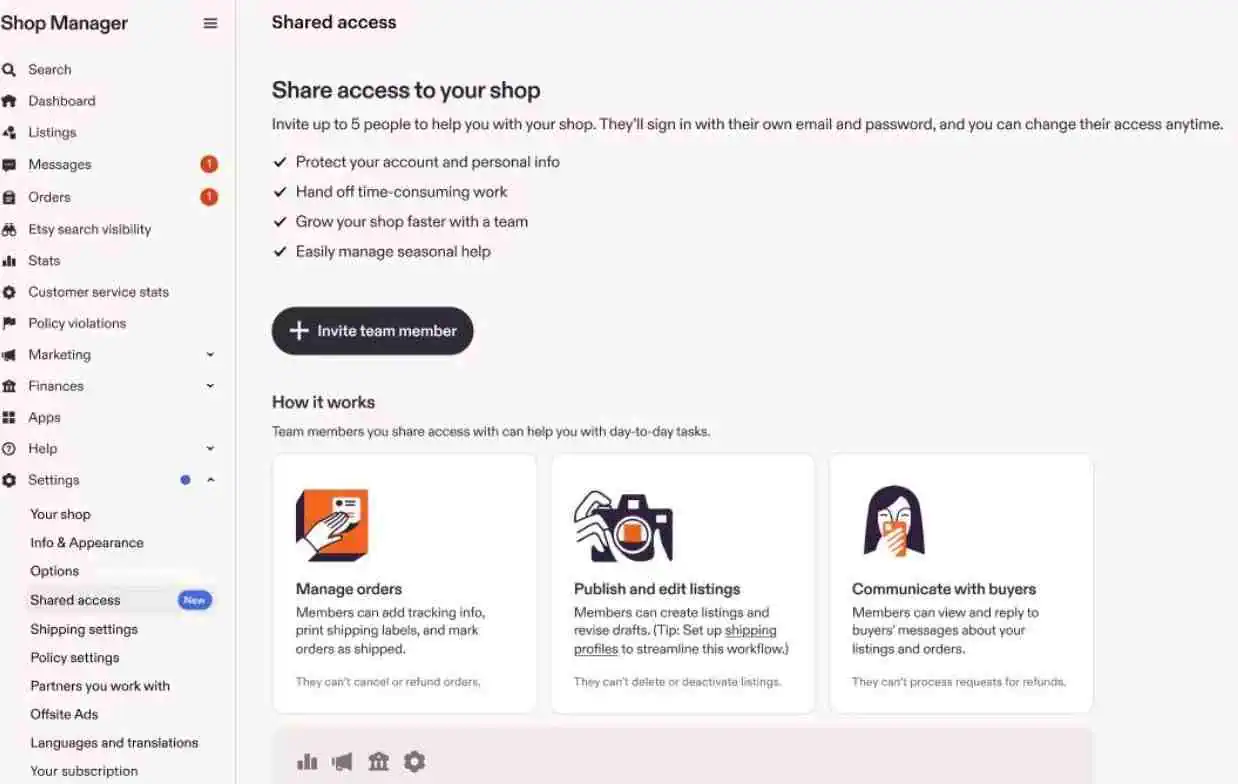
Click Invite team member and enter the email address the person will use for their Etsy account. Send the invitation, which will remain valid for 7 days. If it expires, you must issue a new one.
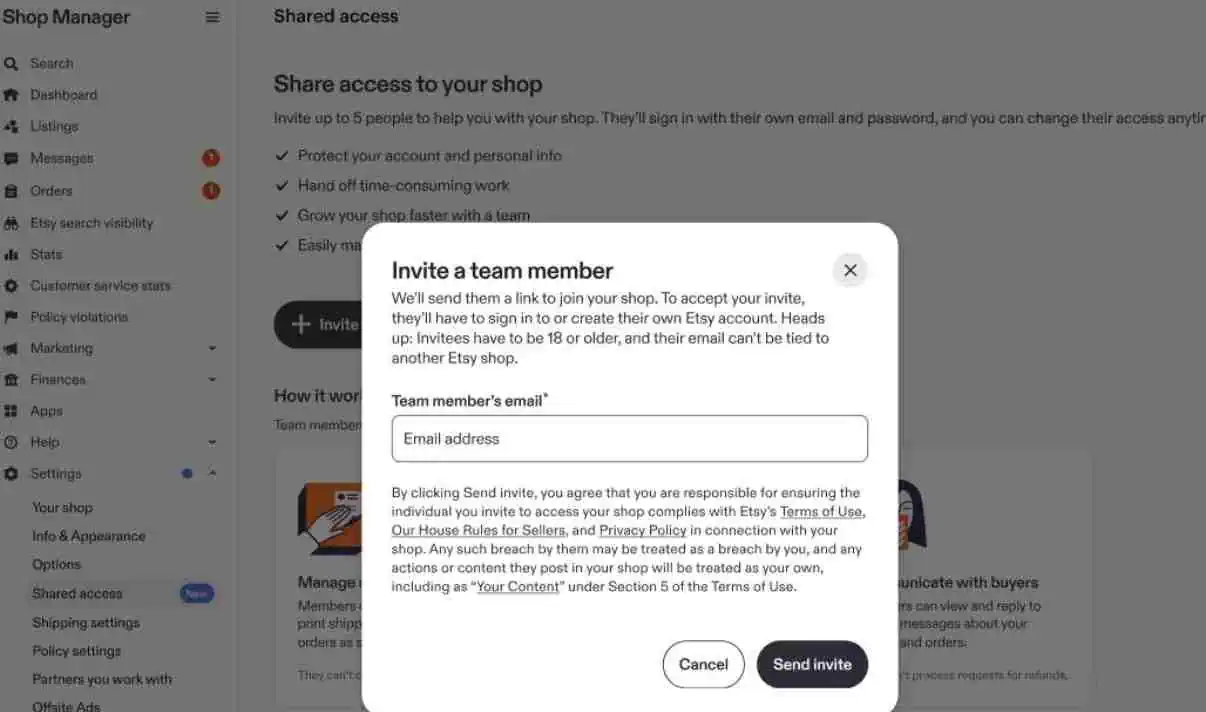
Your invited member will receive an email from Etsy with instructions to join. They can sign in to an eligible existing account or create a new one.
During setup, Etsy asks for details such as their name and phone number. They must also enable two factor authentication (2FA) to proceed.
After completing the required setup, the recipient clicks Accept invite to activate their access. They can then begin working in the permitted sections of your shop.
Not every Etsy account qualifies for Etsy Shared Access, even if the shop owner sends an invitation. To become a team member, you must meet these requirements:
One important restriction: Etsy currently allows each account to be associated with only one shop at a time. If you already own an Etsy shop or belong to another shop’s team, you cannot use that same account to access a different store.
To manage Etsy multiple users across different shops, each person must use a separate Etsy account and email address for each shop.
Although Etsy Shared Access allows you to delegate shop tasks, it comes with restrictions that may affect how you assign responsibilities to your team.
Etsy currently offers a single permission set for all invited team members. You cannot customize Etsy Shared Access permissions based on individual responsibilities.
For example, you cannot create separate roles for:
If you invite someone just to print shipping labels, they will also have permission to create, edit, and publish product listings.
This means you should review the full permission set before inviting anyone, particularly if their responsibilities are limited to one part of your business.
This restriction particularly affects virtual assistants, freelancers, and agencies working with several Etsy clients. Each additional shop requires a separate account, making it harder to switch between stores and manage multiple clients from one place.
For businesses operating several stores, this also means extra account management rather than one central workspace.
Since certain actions remain restricted, sellers need a clear process for handling requests their team cannot complete.
For example, if a buyer requests a refund or order cancellation, the assigned worker must pass the request to the owner. Establishing who handles these requests and when they should be escalated can help prevent delays in customer service.
As Etsy businesses grow, shop owners often need help managing product listings, processing orders, arranging shipments, and responding to customers. The new feature makes it possible to distribute these responsibilities among trusted team members.
Seasonal sellers can also invite temporary staff during busy shopping periods and remove their access once demand slows down.
For print on demand (POD) sellers, the benefits extend to managing large product catalogs. Creating designs, preparing mockups, and publishing listings involve different tasks that can now be divided between team members.
Bulk Mockup helps sellers generate hundreds of product mockups in batches using Photoshop templates. Once the images are ready, a trusted team member can upload them, add product details, and publish listings on Etsy.
Shop owners can revoke a team member’s access whenever necessary. To remove someone, follow these steps:
Removing someone only revokes their access to your Etsy shop. If they also use your cloud storage, design software, print on demand services, or other business accounts, you must remove those permissions separately.
Etsy’s latest update gives growing sellers more control over how they share shop responsibilities. With individual logins, protected financial information, and visibility into team activity, business owners can involve others in daily operations without sharing their credentials.
While custom roles and access to multiple shops remain restricted, the feature is a useful addition for sellers who need reliable support as their businesses expand.
Managing a large Etsy or POD catalog? Explore Bulk Mockup to generate product mockups in batches and spend less time preparing product images.
Etsy currently allows shop owners to invite up to 5 team members. Each person must use their own eligible Etsy account. The limit applies to invited members and does not include the shop owner.
No. Invited members cannot view your earnings, bank details, payment information, or other financial records. Etsy keeps these details accessible only to the shop owner, even when other people help manage daily operations.
An invitation remains valid for 7 days after it is sent. If the recipient does not accept within that period, it expires automatically. The shop owner must then send a new invitation.
Yes. Shop owners can revoke someone’s access whenever necessary, without changing their own account password. Once removed, that person loses their assigned shop permissions, while other invited members can continue working as usual.
Yes. Etsy allows owners to download activity records covering messages, orders, and listings. Open the member’s 3 dot menu, select Download activity, and choose an individual category or download all three as CSV files.